Make a survey today
Forms homepage
Build Send Results
D
S
A

Free Online Survey Maker Sarah

Make beautiful surveys, quizzes, and forms in minutes. Collect responses and analyze results with powerful reporting tools. Alex

Paragraph

Start typing, press / for menu, @ for AI

Multi-Choice (Multi Select)
Multi-Factor Opinion Slider
Multi-Choice (Single Select)
Text Boxes (multiple)
Picture Choice

Trusted by over 3 million users, for over 24 years

Bullhorn
Dominos
PepsiCo
Pinterest
Indeed
NHS

The free alternative to Google Forms & SurveyMonkey

No trial period. No credit card. Just a genuinely free survey maker with the features you actually need.

Mobile surveys

Make mobile surveys that look great on any device

Every survey is a mobile survey by default. Question types scale to fit your respondents' screen size automatically.

Make surveys and analyze reports from your phone or tablet too. No need to wait until you're back at the office.

Scan to try a free mobile survey

Higher completion rates

Surveys that keep respondents moving

Respondents are automatically scrolled to the next question as soon as they answer. No manual scrolling through long pages.

Or switch to single-question-per-page format for a focused, one-at-a-time experience.

How to make a survey in 4 steps

Typeform style
Next
Google Forms style
1
2
3
4
Submit
1

Choose your format

Pick one-question-per-page like Typeform, or multi-question pages like Google Forms and SurveyMonkey. Our guided auto-scroll steps through questions automatically as respondents answer.

1
2
3
+ Add
AI
2

Make your survey manually or with AI

Choose from 20+ question types and build your survey manually, or let AI generate questions for you. AI can also review and proof your survey before you send it.

Link
QR code
Email
Embed
name@example.com
Send
3

Share your survey

Send via link, QR code, or use the built-in email invitation tool to reach your contacts directly. Embed on your website or share on social media.

Results
Group A
Group B
Q1
Q2
Q3
Q4
4

Analyse your results

Responses arrive in real-time with charts and reporting. Use advanced segmentation to filter by audience, and overlay comparisons to see how two groups answered side by side. Features most free tools don't offer.

Unlimited surveys, quizzes & forms

1,000 responses per project

20+ question types

Single or multi-page format

AI question generation

Question logic, branching & piping

Pexels images & videos

Themes & your branding

Share via link, QR, email or embed

Built-in contact manager

Charts, reports & segmentation

120 languages

2002

Established

3m+

Users worldwide

UK + EU

Based and hosted

UK/EU GDPR & CCPA

Design & branding

Craft beautiful designs

More appealing designs not only help your survey stand out from the crowd, they can also help increase response rates.

Our free survey software allows you to customize themes, add a logo, switch fonts, embed images & videos, and offers a range of picture-choice question types.

Remove our branding, host surveys on your own web domain, and customize survey URLs by upgrading to our Pro plan.
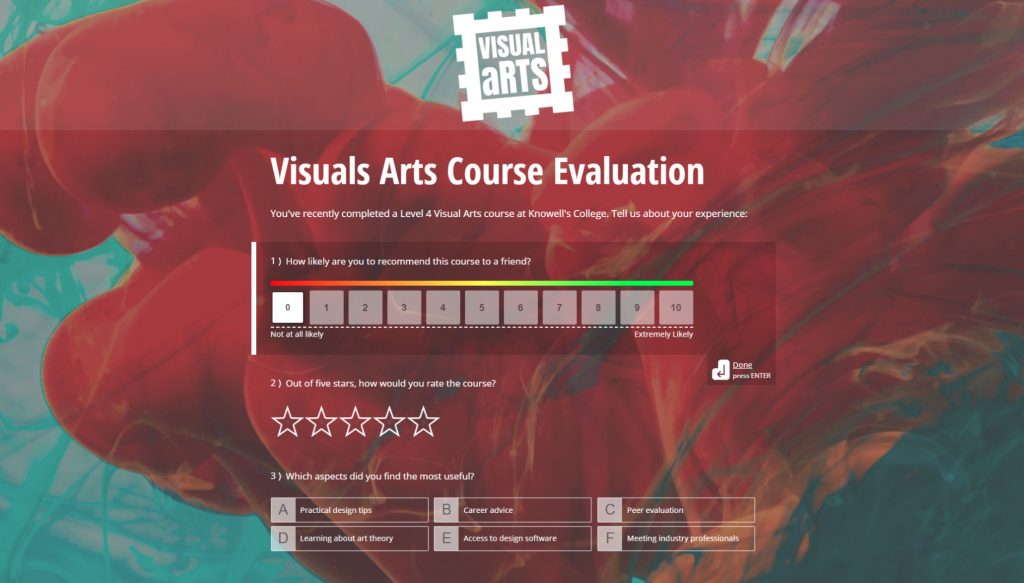
Customizing Survey Themes

Make compliance-friendly surveys

Ensure you're compliant with the GDPR, CCPA, and other data protection laws.

Track consent

Collect and record explicit consent from contacts.

Zero tracking cookies

We don't use cookies to track your surveys or respondents.

Masked IP addresses

Respondent IP addresses are encrypted in our database.

Pseudonymisation

Collect PII whilst keeping response data anonymous.

What Our Customers Say

WWT

The intuitive interface has transformed our processes. Its user-friendly design makes it easy for our team to create, deploy, and analyze surveys quickly. A stress-free interface that boosts productivity and satisfaction.

Mark Stead

Head of Learning, WWT

Chelsea FC

What impressed me was the balance struck between data presentation and simplicity. Intricate survey data is consolidated into digestible visuals, making it easy to identify trends and patterns without getting lost in a sea of numbers.

David Hollinshead

Insight Manager, Chelsea FC

Mention Socials

Since we started using this software, our clients have seen more people participating in surveys, gotten great feedback on how easy it is to respond, and the competitions we run have been completely transformed.

Brad Birchmore

Founder / Director, Mention Socials

Free Survey Maker FAQs

What are online surveys?
Online surveys are a method of data collection used to gather information or opinions from a targeted audience. They typically involve presenting a series of questions to respondents, who then provide their answers online. These surveys can cover a wide range of topics, including market research, customer feedback, product satisfaction, social issues, and more.
Can I make surveys for free?
Yes, you can make surveys for free with FreeOnlineSurveys. Just start by creating an account, and you'll then be taken to your survey dashboard. From there you can make new surveys, including our single question per page survey type, and our classic format with multiple questions per page. There's no limit to the number of surveys you make, or the number of questions and pages you add.
How can I collect survey responses?
You can collect survey responses in a wide variety of ways, including: URL link — simply copy the link we provide and share it with your respondents. QR code — save the QR code to your device, add it to physical media, and place it in a public place. Email invitations — craft beautiful email invitations and send them to your contacts. Web embed — embed surveys on your website inside an iFrame. Social media — share your survey link directly to your social media profiles. Pop-ups & slideouts — have your survey pop up or slide out at the click of a button. Unlike other survey tools, we don't limit the number of collectors you can use per survey.
Are my surveys compliant with the GDPR, CCPA and other regulations?
Absolutely! At FreeOnlineSurveys compliance is at the forefront of everything we do. All of our products are fully compliant with the CCPA, GDPR and other data protection laws, meaning your surveys are compliant by default. We also offer features like pseudonymisation (collect PII whilst keeping response data anonymous), consent tracking, cookieless surveys (no tracking cookies whatsoever), and masked IP addresses (respondent IPs are masked before being stored in our database).
Can I embed surveys on my website?
Yes, with FreeOnlineSurveys you can embed surveys, forms, quizzes, and calculators on your website seamlessly. Simply head to the Send section of your project, scroll to the embed option, and copy the code. From there all you need to do is paste the code into your website and your survey will appear in an iFrame. If you're using a CMS like WordPress or Wix, you can paste this code into an HTML block.
How to generate a QR code for an online survey?
We generate a QR code for each and every project created with FreeOnlineSurveys. You can find the QR code for your survey by heading to the Send section. Simply right click the QR code and save it to your device. Then you can add it to physical media and put it in a publicly accessible location. Respondents can scan the code with the camera app on a mobile device to be taken directly to your survey.
Are surveys anonymous?
All projects including surveys are completely anonymous by default. However, in many cases you'll want to collect personal data in order to track who has and hasn't responded. That's where our pseudonymisation feature comes in — it allows you to collect personally identifiable information (such as names and email addresses) whilst keeping responses to other questions completely anonymous. Response order is randomised in both reports, so there's no way to link PII back to the anonymised question data.
Can I print my survey?
Of course! We understand you might want to print your survey and collect paper copies of responses. You can export a PDF of your form from the Build section, which can then be saved to your local drive and printed when needed. Then when it comes to adding those responses to your report, you can use the form URL to submit them manually.
How do I make a survey with FreeOnlineSurveys?
Making a survey is simple. Sign up for a free account, then click Create New from your dashboard. Choose from a one-question-per-page format or a multi-question page layout. Add questions using our drag-and-drop builder or let AI generate them for you. When you're ready, share your survey via link, QR code, email invitation, or embed it on your website. Responses arrive in real time with charts and reporting built in.
What makes FreeOnlineSurveys the best free survey maker?
Three things set us apart. First, our free plan is genuinely usable: unlimited surveys, 1,000 responses per project, 20+ question types, logic and piping, and custom branding. Most competitors restrict these features to paid plans. Second, privacy: we're a UK company with GDPR compliance built in, zero tracking cookies, masked IP addresses, and pseudonymisation. Third, the built-in contact manager means you don't need a separate CRM to track who responded and follow up.
Is FreeOnlineSurveys a good alternative to Google Forms?
Yes. Google Forms is a basic tool that works for simple questionnaires, but it falls short for anything more advanced. FreeOnlineSurveys gives you features Google Forms simply doesn't offer: payment collection, digital signatures, interactive question types like sliders and picture choice, and single-question-per-page auto-scroll surveys. Reporting is where the biggest gap is — Google Forms gives you basic pie charts, while we offer cross-tabulation, audience segmentation, data comparison, and filters. On privacy, FreeOnlineSurveys is built by a UK company with GDPR compliance at its core — zero tracking cookies, masked IP addresses, pseudonymisation, and consent tracking built in. Google Forms respondents also need a Google account for features like file uploads, whereas our surveys work for everyone without sign-in.
Is FreeOnlineSurveys a free alternative to SurveyMonkey?
Yes. SurveyMonkey limits free users to 10 questions per survey and 25 responses per survey — making the free plan almost unusable for real research. FreeOnlineSurveys gives you unlimited questions, unlimited surveys, and up to 1,000 responses per project on the free plan. You also get question logic, answer piping, custom branding, 20+ question types, and a built-in contact manager — all features SurveyMonkey locks behind paid plans. When you do need to upgrade, our paid plans start at a fraction of SurveyMonkey's pricing.
How does FreeOnlineSurveys compare to Microsoft Forms?
FreeOnlineSurveys is a free alternative to Microsoft Forms that doesn't require a Microsoft 365 subscription. You get more question types, advanced logic and branching, custom survey branding, a built-in contact manager, and powerful reporting with filters and cross-tabulation — all on the free plan. Microsoft Forms is limited to users within the Microsoft ecosystem, while FreeOnlineSurveys works for everyone and is fully compliant with UK GDPR, EU GDPR, and CCPA.

Ready to Get Started?

Create your first survey, quiz, or form for free. No credit card required.

or
Sign up with Google